

Converts between MKV, AVI, OGG, FLV, MP4, RMVB, 3GP, XviD and other video formats or MP3, APE, WAV, FLAC, WMA and other audio files. Also extracts the audio from video files.
Xilisoft Video Converter Ultimate is an easy-to-use powerful tool for converting between more than 160 audio and video formats.
The software features a clearly arranged, demonstrable menu which helps you to work with video files quickly and effectively. For instance, you can easily clip audio and video files using the Clip function. The only thing you have to do is to enter the Clip window and set Start Point and End Point to clip the segments you want.
The program gives the opportunity to merge videos or pictures into one file by clicking Merge Selected Items into One. It can also convert HD videos and videos for iPad, iPhone and Samsung Galaxy. And not only that, Xilisoft Video Converter Ultimate is able to convert 2D video into 3D with one click.
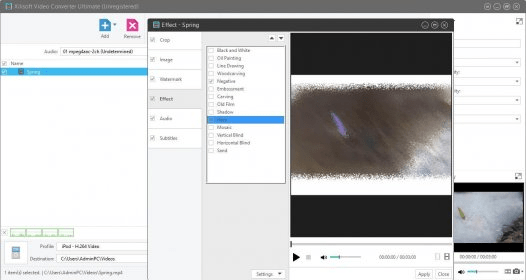
It also enables you to add stunning effects to your video: oil painting, line drawing, sand, shadow, haze, mosaic, oil film, and many others. Besides, it is possible to change brightness, contrast and saturation to obtain the look-for result. If you want to add text or image watermarks to the video file, you should just enter the Watermark setting menu, select a watermark and its parameters: position, color, size, style, etc.
To sum up, Xilisoft Video Converter Ultimate is a genuine expert in audio and video conversions, which can serve as the complete solution for you to enjoy the multimedia life.






Comments (6)
It does not allow to actually use the tools provided.